Selecting a wearable IMU is a specification problem before it is a procurement problem. The variable a study needs to report, such as segment orientation, a joint angle, spatiotemporal timing, or peak acceleration, determines sensor count, sampling rate, and attachment method well before any vendor or product name becomes relevant. A study of trunk posture across an eight-hour shift and a study of knee mechanics during a cutting manoeuvre call for different hardware, and the lower-cost option is not necessarily the one with fewer sensors.
This guide covers five categories of wearable inertial sensor currently used in movement research, the seven technical criteria that differentiate them, and the questions worth raising with a vendor before a grant line is committed.
What does a wearable IMU actually measure?
An inertial measurement unit measures three quantities at its point of attachment: linear acceleration, angular velocity, and the local magnetic field. Sensor fusion combines these into the orientation of the body segment carrying the sensor, and that orientation becomes the raw input for downstream processing and modelling.
A movement research workflow typically produces:
- Segment orientation, the tilt and rotation of the thigh, shank, pelvis, or trunk in three dimensions.
- Joint angles, calculated by relating two adjacent segments to each other.
- Spatiotemporal metrics, including cadence, step time, stance and swing duration, and stride symmetry.
- Acceleration and angular velocity in their own right, used for impact, load, and intensity measures.
- Derived outcomes such as asymmetry indices, movement variability, and task-specific scores.
Five categories of wearable inertial sensors
The market spans devices built for very different research questions, from single-day activity logging to full-body biomechanical modeling. Five categories cover most of what movement research groups currently use.
- Wrist-worn accelerometers and activity monitors
Small, single-site loggers designed for long recordings in free-living conditions, often over days or weeks. They excel at habitual activity, sedentary time, sleep, and step counts across large cohorts. They are not a kinematics tool. Choose this category when exposure over time is the outcome, not joint mechanics. - Small multi-purpose inertial sensors with a development kit
Compact sensors used individually or in small sets, usually paired with a mobile or desktop application and a software development kit. This is the flexible middle of the market. One sensor on the trunk, two around a joint, or four on limbs covers a large share of applied research and clinical measurement, and the development kit means a team can build the exact protocol, output, and report it needs.
Their limit is scope rather than quality. A small set provides excellent data on the specific segments it covers while keeping the setup simple. Choose this category when the research question is focused, when the study runs outside a laboratory, or when the measurement will eventually live inside your own application. - Full-body inertial motion capture systems
Seventeen-sensor systems that produce full-body joint kinematics without cameras or markers, worn as a suit or as straps over normal clothing. They give whole-body context, so a compensation at the hip shows up alongside the knee measurement, and they capture it in a lab, a gym, a workplace, or outdoors.
The trade-offs are setup time and participant preparation, and a higher initial investment. Choose this category when the question is multi-joint, when compensations matter, or when one system has to serve several research groups with different protocols. - Integrated multi-modal laboratory platforms
Systems that combine inertial kinematics with electromyography, pressure, or force in one synchronised software environment. Where muscle activation has to be interpreted against joint motion in the same timeline, an integrated platform removes a genuine source of error and effort.
The cost is flexibility. These environments are usually strongest inside their own ecosystem and less comfortable when a team wants to move data into a specific modelling pipeline. Choose this category when multi-modal synchronisation is the central methodological requirement. - High-impact field sensors
Ruggedized sensors with a high-g measurement range, built for impacts, collisions, and peak loading in sport. They record events that would saturate a standard inertial range. Choose this category when the outcomes are the impact magnitude and count.
How do you choose? Seven criteria that actually separate systems
-
Start from the measurement, not the sensor count. Write down the variable your analysis needs, then work backwards to the segments involved. Buying three sensors and discovering the outcome costs five times more than buying five.
-
Match the sampling rate to the movement's speed. Walking and posture are well served at modest rates below 100 Hz. Sprinting, jumping, throwing, kicking, and change of direction require higher rates.
-
Ask how the system handles magnetic disturbance and drift. Every inertial system integrates angular velocity over time, so every inertial system has to manage accumulated error. Steel structures, treadmill motors, and building services all distort the local magnetic field. The honest question is not whether it drifts, but how it is constrained, and what happens to accuracy over a fifteen-minute recording near a metal frame.
-
Read the validation evidence. It is best to find validation articles matching your setup. Check five things: the task performed, the joint and plane reported, the reference system compared against, the sample and population, and the error metric used.
-
Check the export path into your analysis tools. Confirm the file formats, whether live streaming is supported as well as export, and whether the specific tools your group runs are supported.
-
Test the practical constraints on a real participant. Battery life across a full session, attachment security on sweating skin, ingress rating if the work involves water or dust, synchronisation with anything else you record, and the time it takes to set up and clean between participants.
-
Cost the whole study, not the sensor. Add software licensing and renewals, training, support response times, replacement parts, calibration time per session, and the analyst hours the workflow will consume. A sensor that is cheaper per unit and slower per participant is often the more expensive choice across a three-year project.
What should you ask before you buy?
Take this list into the vendor conversation. Every question has a short, checkable answer, and the ones that produce vague replies tell you the most.
-
What is the streaming rate, and what is the on-device recording rate?
-
How is magnetic disturbance handled, and what happens to accuracy over a long recording near metal?
-
What file formats are exported, and is live streaming supported into the tools my group runs?
-
What is realistic battery life for my session length?
-
How do I synchronise this with the other equipment already in my protocol?
-
How long does setup and changeover take per participant, measured rather than estimated?
-
Can I run a trial on my own protocol with my own participants before deciding?
The five categories compared
|
Category |
Measures well |
Best fit |
Main limitation |
|
Wrist-worn activity monitors |
|
|
|
|
Small sensors with a development kit |
Segment orientation, single-joint angles, range of motion, spatiotemporal metrics |
Focused questions, out-of-lab measurement, custom applications |
Covers only the segments instrumented, no whole-body context |
|
Full-body inertial motion capture |
Full-body joint kinematics, compensations, multi-joint coordination |
Multi-joint research, shared systems, several protocols |
More setup and preparation per participant, higher initial investment |
|
Integrated multi-modal platforms |
Kinematics synchronised with muscle activation, pressure, or force |
Studies where multi-modal timing is the core requirement |
Strongest inside their own ecosystem |
|
High-impact field sensors |
Peak acceleration, impacts, collision counts |
Contact sport load and impact monitoring |
Impact magnitude is not joint kinematics |
Pricing varies by system, sensor count, and software package, so compare quotes on what each one includes rather than on a headline figure.
Where Xsens fits
Xsens spans two of these five categories, which is why the same conversation can end in very different recommendations.
Xsens DOT sits in the small-sensor category. Each sensor weighs 11.2 grams, is rated IP68, runs up to eight hours, and connects over Bluetooth 5.0. It streams at up to 60 Hz and records on-device at up to 120 Hz, which is the number that matters for jumps, sprints, and change of direction. Three routes into the data are supported: a development kit in Java, Objective-C, C++, C# and Python across Android, iOS, Windows and Linux, the Xsens DOT app for teams who need data before they need code, and published Bluetooth service specifications for low-level work.
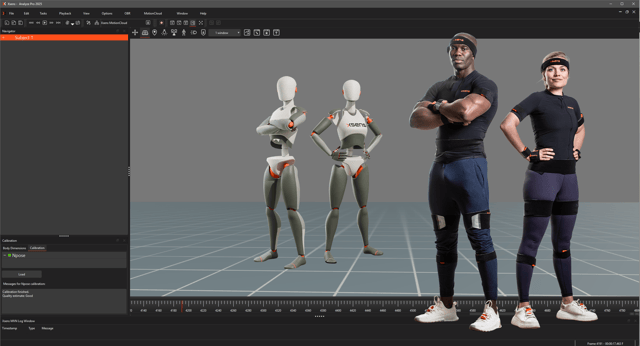
Xsens Awinda Starter, Xsens Awinda, and the next-generation Xsens Link sit in the full-body category, all seventeen sensors. Awinda Starter and Awinda are strap-based and worn over regular clothing, run for around twelve hours, and update at 60 Hz, which suits gait, posture, ergonomics, and general movement analysis. The next-generation Xsens Link updates at up to 240 Hz with a range of around 150 metres, for high-dynamic sport and demanding capture over distance.
Across both, the parts that matter for research are the same:
- Capture without cameras, markers, or a fixed volume, so the study can run where the movement genuinely happens.
- Repeatable setup, so a measurement taken in March is comparable with the same measurement in September.
- Xsens Analyze for processing, reporting, and export, with published integrations into biomechanics, modelling, and ergonomics tools rather than an isolated capture step.
- A published validation and research record you can point a reviewer or a procurement committee towards.
Summary: buy for the measurement, not the specification sheet
The best wearable inertial sensor for movement research is the one that returns the variable your analysis needs, at a rate that survives the fastest task in your protocol, with validation evidence that matches your joint and your population, and an export path into the tools you already run. Sensor count, brand, and price all follow from those four things.
FAQs
- What is the best wearable IMU sensor for movement research?
There is no single best sensor, because the right choice is set by what you need to measure. A focused question about one joint or segment is well served by a small sensor set with a development kit. A multi-joint question, or one where compensations matter, needs a full-body system of around seventeen sensors. Match sampling rate to the fastest task in your protocol and check that validation evidence exists for your joint and population. - How many IMU sensors do I need?
It depends on the variable, not the budget. A single sensor reports the orientation of one body segment. A joint angle needs two sensors, one on each adjacent segment. Full-body joint kinematics normally requires seventeen. List the segments involved in your outcome measure and the number follows. - Do inertial sensors drift?
All inertial systems accumulate orientation error over time, so the useful question is how that error is constrained. Sensor fusion algorithms combine accelerometer, gyroscope, and magnetometer data to correct it, and systems differ in how well they cope with the distorted magnetic fields found near steel structures, treadmill motors, and building services. Ask what happens to accuracy across a recording of the length you actually run, in the environment you actually use. - Can I collect research-grade movement data outside a laboratory?
Yes. Inertial systems need no cameras, markers, or fixed capture volume, so data can be collected in a lab, a gym, a clinic, a workplace, or outdoors. That is the main methodological reason research teams choose inertial measurement, because it allows the task to be studied where it is genuinely performed rather than where the cameras happen to be. - Can I build my own application on a wearable sensor platform?
Yes, if the platform publishes a development kit. Xsens DOT supports development in Java, Objective-C, C++, C# and Python across Android, iOS, Windows and Linux, alongside a ready-made app and published Bluetooth service specifications. Confirm the current language and platform list, and check that the sampling rates available through the development kit match those quoted for the hardware.
Ready to build your pipeline?
Tell us which software you use, and we will recommend the right Xsens motion data system for your workflow.